Whitelisted FiveM Community
The Shoreline Project
The Shoreline Roleplay Community Operations Portal.
0Members Applied
0Applications Accepted
0Current Members
About Shoreline
Built For Serious Roleplay
The Shoreline Project is a Massachusetts-based whitelisted FiveM community focused on structured storytelling, realistic departments, and clean community operations. More than a community, Shoreline is a family built around respect, consistency, and shared roleplay standards.
New Members
How Do I Apply?
Follow these steps to submit your Shoreline application and keep track of the result.

Sign In With Discord
Use the Discord login button so the portal can verify your account and connect your application to your community profile.

Open The Apply Page
Select Apply from the navigation or press Start Application on the homepage.
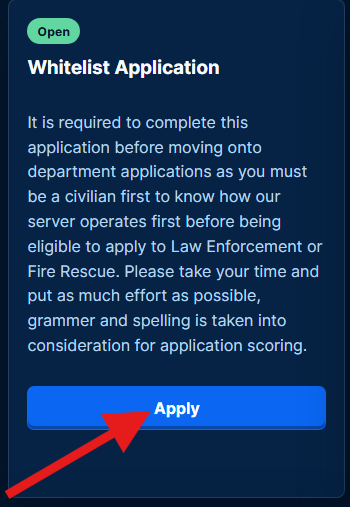
Choose The Right Application
New members should start with the membership application, then apply for department paths once eligible.
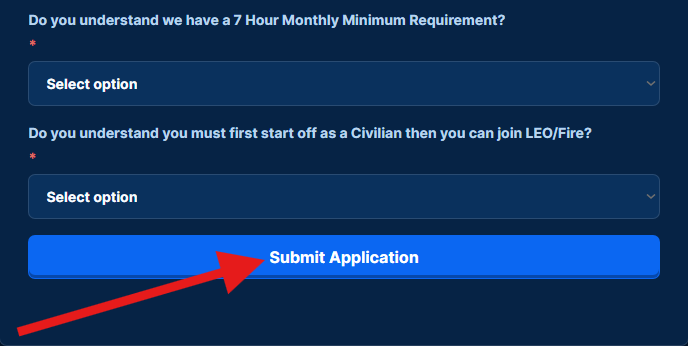
Submit And Watch For Results
After submitting, staff will review your answers. Accepted applicants should check Discord DMs and the results channel for next steps.
What To Expect
Professional Scenes, Community Standards, And Room To Grow
Shoreline is designed for members who want dependable roleplay, active departments, and a welcoming Massachusetts-inspired setting. Whether you are applying for membership, joining a department, or getting involved with community events, the portal keeps your next step easy to find.
Community Help
Frequently Asked Questions
Quick answers for guests who are looking to join, apply, or understand our community expectations.
How do I become a member?
Head to tspcommunity.org/apply and log in with Discord. From there, complete the Whitelist Application so staff can learn a little about you and see if you are a good fit for the server. We currently use applications only, with no interview requirement.
How do I know if I passed or failed?
After submitting your Whitelist Application, please allow staff up to 24 hours to review it. Once reviewed, results will be posted in #application-results, and accepted members will receive a Community Onboarding guide in their Discord DMs.
How do I become Law Enforcement or Fire Rescue?
New members need at least 3 hours as a civilian inside an active patrol before applying for Law Enforcement or Municipal Fire Rescue. This helps you understand how patrols run and decide where you want to grow in the community.
What CAD do we use?
We use ImperialCAD.
How many people are usually on per night?
It changes each night, but the community is growing quickly. We usually have around 5-10 people per night, and patrols often last about 5-6 hours.
What is your Community Monthly Hour Requirement?
All members, including Civilians, Law Enforcement, Fire Rescue, and Dispatchers, must complete at least 7 hours monthly to meet activity requirements.
Whitelist Applications
Choose Department
Select the department you want to apply for. Closed applications cannot be submitted until staff reopen them.
Submitted
Application Submitted
Your application has been sent to the staff queue.
ApplicationDepartment Application
StatusPending Review
Next StepStaff Review
Discord Account
Your Profile
Account
Settings
Member Support
Support Tickets
Community Membership
Membership
Access member tools and community request systems.
Community Hub
Important Resources
Quick access to the most important Shoreline Project links and department resources.
Community
Core Links
Community Website
Community Rules & Regulations
Leave of Absence Request Form
Membership Complaint Form
San Andreas General Laws
Donation Transparency Sheet
Civilian Information
Civilian Resources
Civ Ops Public Roster
Civ Ops Operation Guide
Civilian Standard Operating Procedures
Civilian Contact Levels
Civilian Activity Submissions
ImperialCAD
CAD Access
Civilian Key
TSP.1729:CIV
For specific department keys, open a ticket inside your department Discord.
Department Discords
Discord Links
Our Main Discord
San Andreas State Police
Municipal Police
Municipal Fire & Rescue - W.I.P
State 911 Department - W.I.P
Community Leadership
Server Directory
View our community leadership members and department leadership members.
Community Gallery
Server Media
Privacy & Security
Privacy Policy
Effective Date: May 15, 2026
Revision Date: May 15, 2026
The Shoreline Project Operations Portal is used to manage community applications, support tickets, media posts, member profiles, notifications, and staff review tools. This policy explains what information is collected, why it is used, and how it is protected.
Information We Collect
When you login with Discord, the portal may store your Discord user ID, username, display name, avatar, server membership status, role IDs, and the permission level needed to show the correct website features. When you submit an application, support ticket, disciplinary appeal, or website reply, the portal stores the information you choose to provide in those forms.
The portal may also store application decisions, denial reasons, reviewed-by details, staff responses, support ticket status, notification history, media captions, and timestamps so members and staff can see accurate records after a restart or deployment.
Profile information shown to staff or admins is limited to information that is normally visible from Discord or the Discord server, such as your username, display name, avatar, user ID, and server roles, with the addition of Shoreline community records connected to your account.
How Your Information Is Used
Your information is used only for community operations: verifying Discord membership, showing your profile, routing applications to staff, notifying you about application or ticket updates, keeping support tickets connected to Discord channels, and preserving administrative records needed to run the community fairly.
Discord role IDs are used to decide which website features you can access. For example, staff roles may allow application review, media roles may allow media uploads, and whitelisted admin roles may allow administrative tools.
How Information Is Stored
Website records are stored as server-side data files on the configured Railway persistent volume. This allows applications, support tickets, notifications, disciplinary records, media records, settings, and other community records to stay available after the website restarts or redeploys.
Login sessions are maintained with server-side session records and signed browser cookies. The cookie helps the website recognize your session, while the full operational records stay on the server.
How Information Is Protected
The portal uses Discord login to connect your website account to your community profile. Administrative actions are protected by role-based permissions, meaning members can only access features allowed by their Discord roles.
Who Can See Your Information
Members can see their own profile, applications, notifications, disciplinary actions, appeals, and support tickets. Staff can see information required for their assigned duties, such as reviewing applications or replying to tickets. Whitelisted admins can access broader administrative records when needed to manage the community.
Staff and admin profile lookup shows information connected to the member and the community. This includes the same type of account and role information a Discord server member could generally see by opening your profile in Discord, plus Shoreline-specific information such as application history, ticket history, disciplinary actions, appeals, permissions, and review records.
Support ticket messages may be mirrored between the website and the connected Discord ticket channel so staff can respond from Discord while members can read replies on the website.
Information Sharing
The portal does not sell member information. Information may be shared with Discord only as needed for normal community features, such as checking roles, creating ticket channels, posting logs, sending direct messages, or assigning accepted application roles.
Retention
Applications, ticket history, notifications, media records, and disciplinary records may be kept so the community has an accurate operational history. Closed or deleted tickets may be removed from the website when the connected Discord channel no longer exists. Admins may delete certain records when allowed by the website tools.
Your Choices
You can logout at any time from the website. You can choose not to submit applications, tickets, appeals, or media-related content. If you need a record corrected or removed, contact community staff through the support page or Discord.
Updates To This Policy
This policy may be updated as the website changes. Updates will be posted on this page so members can review the current privacy practices.
Discord Bot Terms
Terms of Service
Effective Date: May 25, 2026
Revision Date: May 25, 2026
These Terms of Service apply to The Shoreline Project Discord bot and the website features connected to it. By using the bot, interacting with its Discord messages, logging into the portal with Discord, submitting applications, opening support tickets, or using related community tools, you agree to these terms.
Purpose of the Bot
The Shoreline Project bot supports community operations for The Shoreline Project. It may help manage applications, support tickets, member notifications, disciplinary action messages, Discord role checks, server media, status updates, and staff or admin workflows.
The bot is provided for community use only. It is not intended for emergency services, legal notices, financial decisions, or any situation where delayed or unavailable bot responses could cause harm.
Acceptable Use
You may use the bot and connected website tools for legitimate Shoreline Project community activity. You may not use the bot to harass others, submit false information, spam tickets or forms, impersonate another person, attempt to bypass permissions, interfere with bot operation, or use the service in a way that violates Discord's Terms of Service, Discord's Community Guidelines, or Shoreline Project community rules.
Staff and admins may take action on misuse, including closing tickets, removing access, restricting website permissions, deleting inappropriate content, or escalating the matter through community moderation channels.
Discord Account and Server Access
Some bot and website features require you to login with Discord or be a member of the Shoreline Project Discord server. Your available features may depend on your Discord roles, community status, application history, or staff permissions.
If you leave the server, lose required roles, are restricted, or are removed from the community, some bot and website features may stop working for your account.
Applications, Tickets, and Community Records
Applications, support tickets, ticket replies, disciplinary action records, appeals, media posts, notifications, and related staff actions may be stored so the community can maintain accurate records and continue operating after website restarts or deployments.
Application decisions, ticket responses, and disciplinary outcomes are handled by Shoreline Project staff according to community procedures. Bot messages and website records are tools that help deliver those decisions, but staff remain responsible for community moderation and review choices.
Bot Messages and Direct Messages
The bot may send messages in Discord channels or direct messages to notify members about applications, support tickets, disciplinary actions, appeals, maintenance mode, or other community updates. Direct messages may fail if your Discord privacy settings block messages from server bots or members.
Availability and Changes
The bot and website are provided as available. Features may be changed, paused, disabled, or removed as the community's needs change. Maintenance mode may temporarily limit access to the website while updates are being made.
The Shoreline Project is not responsible for downtime caused by Discord, hosting providers, network issues, maintenance, or other service interruptions outside normal control.
Privacy
Use of the bot and connected website features is also covered by the Privacy Policy. The Privacy Policy explains what information may be collected, how community records are used, and who can access those records.
Termination of Access
The Shoreline Project may restrict, suspend, or remove access to bot or website features at any time when needed to protect the community, enforce rules, prevent abuse, or comply with Discord requirements.
Updates To These Terms
These terms may be updated as the bot or website changes. Continued use of the bot or connected website tools after updates are posted means you accept the updated terms.
Contact
Questions about these terms can be sent through the Shoreline Project support page or through the community Discord server.
Staff Console
Admin
Applications
Review Queue
Members
Profile Lookup
Discord Moderation
Action Center
Member Discipline
Disciplinary Actions
Application Builder
Application Editor
Department Applications
Open & Closed Status
Support
Ticket Queue
Membership
Requests
Review membership and department request queues from one place.
Staff Operations
Patrol Scheduler
Community Notice